
What Is a Self‑Custody Wallet? A Complete Beginner Guide
Self Custody sounds a bit complicated word, but the meaning of this word is really deep and simple which is “that you control your own crypto instead of trusting a company or exchange to keep it
Self Custody sounds a bit complicated word, but the meaning of this word is really deep and simple which is “that you control your own crypto instead of trusting a company or exchange to keep it safe for you”
This beginner friendly guide break down What a Self-Custody Crypto Wallet is, how it actually works and how safely you can start your self custodial crypto journey easily with Oppi Wallet
Just a reminder that this article is for education purposes only and is not financial or tax advice. So always do your own research and then only invest. Never risk money which you cannot afford to lose.
1. Why “Not Your Keys, Not Your Coins” Matters
In the world of crypto you will again and again hear people say “not your keys, not your coins”. But you might have question that what this actually means. So basically this line means that if you don’t have private keys of your wallet then you are putting your trust in someone else to handle your money.
When you keep your digital assets on an exchange or a custodial wallet, then there is a risk that the company could get hacked, or go bankrupt, or they can even freeze your withdrawals.
We have seen major exchanges getting crash or bankrupt even before, and many users lost their access to their funds overnight because they didn’t have self custody.
Using a self custody crypto wallet means that you directly control your crypto on the blockchain and you don't need a permission of another third person to access.
But as everyone knows, “with great power comes great responsibility”. It is the same with self-custody. There is no difference. While you definitely get full control, but that control comes with new responsibilities, especially security. You must take these responsibilities seriously, or you risk losing your funds.
2. What Is a Self‑Custody Crypto Wallet?
A self-custody crypto wallet (sometimes also called self-custodial or non-custodial wallet) is basically a wallet where only you own & control private keys of your crypto assets and not even the crypto wallet app you are using have access.
This means that no one means no one even your crypto wallet provider, banks, exchange or any other apps can move your crypto from one wallet to another, or use them or freeze them or even they cannot stop you from using crypto as no one has access except you
Apps like Oppi Wallet helps you create this type of private keys, keep them safe on your device and handle your transactions.
To make things clear, a non-custodial wallet doesn't actually store cryptocurrencies inside it. Your funds are still on the blockchain, and the wallet just acts as the tool showing that this crypto is owned by you.
Nowadays, you will hear words like “self-custodial wallet,” “non-custodial wallet,” or “self-hosted wallet,” but they all point to the same meaning. These are just terms used by different companies.
In fact the main point is that having full access to your crypto wallet makes you the king. But do remember with the full ownership of private keys comes significant responsibilities and if you fail to manage it, then you could lose your crypto
3. Custodial vs Self‑Custody Wallets: Simple Comparison
To know more about self-custody, it is good to compare it with custodial wallets
So basically, a custodial wallet is provided by an exchange or services that keeps your private keys safe for you, to understand this easily you can say it as a concept of bank, where banks keep your assets safe
When you use a Custodial Wallet:
-
The exchange or custodial wallet provider you are using can freeze your withdrawals, restrict your access, and even shut down your account
-
Your funds are constantly at risk and never 100% safe because if the company might get hacked or go bankrupt, you lose everything
When you use a Self-Custodial Wallet
-
You control your own private keys directly on your device. This means you are the only one who can manage your transactions (buy, sell, swap, store, spend) it all depends entirely on you.
-
As you own your private keys, you are in full control. The self-custodial wallet you are using also adds extra safety with security features like 2 factor authentication (2FA), KYC, Fingerprint and Face Scan. The best part is, even if the company gets hacked, then also your money is safe because the app also doen't have access to your private keys. Just remember that you must keep your phone sage from viruses and write down your private keys on paper and keep it in a safe place
Custodial wallets are often easier to use for beginners, but they come with a high risk factor. You have to trust a third party to stay secure and honest with your money.
Whereas, a Self-Custody Wallet removes that risk because you are the one managing your private keys.
However, this brings a new challenge that you must back up your device and protect it from malware and hacks. Although the app provides advanced security features, that is not enough when it comes to money, so you have to become vigilant.
4. How Self‑Custody Works in Simple Words
Every self-custody wallet basically follows two main principles. First one is a public key (your wallet address) and the other one is private key (your secret address/code)
To easily understand these principles you can consider the public key as your email address which you can share with anyone and the private key as your password which you must never share with anyone.
When you create a new self-custody wallet, the app generates a pair of keys (public and private) along with a Recovery Phrase (also known as a Seed Phrase), which usually consists of 12 to 24 words.
This Seed Phrase acts as a human‑readable backup code. If your phone is ever lost or broken, or if you want to access your funds on a different device, you can simply enter this phrase to recover your wallet.
The phrase follows a universal standard (BIP39), meaning it is compatible with most wallets. You must write down the entire phrase on paper and store it in a safe place. We strongly advise against storing your Seed Phrase digitally (like in a screenshot or text file). If your phone is hacked and a thief finds this code, they can easily access your funds
Now you might have a question: since only you know the private key, how does a Self-Custody Wallet like Oppi Wallet manage transactions?
The answer is simple to this. Your private keys are encrypted and stored safely on your device (not on our servers). When you want to buy crypto or sell your crypto or even swap your crypto with other crypto, the Oppi Wallet app uses these keys in the background to locally 'sign' and authorize the transaction. This way, the transaction is approved without your private keys ever leaving your phone.
Remember: if your phone is lost or broken, your Recovery Phrase (Seed Phrase) is the only way to restore your wallet. However, if you lose both your phone and your Seed Phrase, no one including Oppi Wallet can recover your funds.
Therefore, you must store your Seed Phrase in a secure vault or safe place that only you can access.
5. Types of Self‑Custody Wallets
There are quite a few types of Self-Custody Wallets in the world out there, and each one is suited for different needs and preferences
Once you understand your habits and preferences, it becomes easy to select and set up the right crypto wallet from the thousands available. Making the right choice will help you use your crypto exactly the way you want.
Now that you know that there are two types of classification in Crypto Wallets. One is a custodial wallet and the other is non-custodial wallet.
So now, even within non-custodial wallets, there are two main types, the first is a Hardware Wallet (also known as a Cold Wallet), and the second is a Software Wallet (also known as a Hot Wallet).
Hardware Wallets (Cold Wallets) are small physical devices that provide the highest level of security because they store your private keys offline. This keeps you safe from online hacks, phishing, and scams. That is why cold wallets are mostly preferred for long-term storage of large amounts of crypto.
However, with these benefits come some drawbacks. Like they are not suitable for frequent traders because you have to physically connect the device to a computer or phone for every transaction. It also takes time to set them up securely.
You also need to purchase the device, which typically costs between $50 to $200. While online risks are now not a threat, there is a physical risk. If your device is stolen, lost, or damaged, and you do not have your seed phrase backup, you will permanently lose your funds.
On the other hand, mobile software wallets (Hot Wallets) like Oppi Wallet also store your private keys securely, using advanced encryption and extra layers of protection like 2FA, Fingerprint, and Face Recognition.
Hot wallets are ideal for frequent traders and everyday use. They are generally much easier to set up than cold wallets and come with user-friendly interfaces that are perfect for beginners to start their journey into crypto.
Unlike cold wallets that cost money, hot wallets are usually free to download and use, offering more useful features without the upfront cost of downloading.
Most hot wallets are mobile apps like Oppi Wallet, which you can easily download from the Google Play Store or App Store.
Beyond just self-custody, Oppi Wallet offers advanced features like multi-chain compatibility, allowing you to Buy, Sell, Swap, and Store various cryptocurrencies in one place.
Most importantly, Oppi Wallet bridges the gap to the real world. You can spend your crypto everyday via our Virtual Mastercard or Physical VISA card, accepted anywhere VISA or Mastercard is supported.
Oppi Wallet even offers a specialized Travel Card feature, letting you book flights and hotels directly within the app using your crypto which eventually saves your money on exchange rates and fees.
Not only Oppi Wallet, but other hot wallets also provide various extra functionalities, which you can explore by trying them out.
Beyond mobile apps, there are two other types of hot wallets. Desktop Wallets and Browser Extension Wallets.
A Desktop Wallet can be more beneficial if you want slightly more security, as your computer is not connected to the internet all the time, whereas your mobile is almost always connected to data or WiFi.
However, this security feature only works if your desktop is clean of malware and viruses—meaning your computer must be as clean as when you first bought it for the security to work best. If your computer is infected, then both Desktop and Mobile wallets face similar risks.
Next is the Browser Extension Wallet. You do not need to download software to your desktop or mobile; instead, these download as an extension inside your web browser and live there. This allows you to access your crypto directly while browsing.
Browser extension wallets are famous for easily connecting with a wide range of dApps (Decentralized Apps). However, they are often considered the weakest of these three types because web browsers are highly vulnerable to attacks. Therefore, you must be extremely cautious when using this type of wallet.
Now that you understand cold wallets, hot wallets, and the types of self-custody apps, there is one more choice to make when starting out.
You must decide between a Single-Access Self-Custody Wallet and a Multi-Access Self-Custody Wallet. The main difference between these two comes down to security vs. convenience.
In a single-access wallet, your crypto is generally more secure because there are no other devices linked to it, which limits potential vulnerabilities. If you use a mobile device with an advanced security crypto wallet or a desktop that is clean of viruses and malware (as fresh as when you first bought it), then definitely your crypto remains highly secure, and no one can touch it without your knowledge.
However, high security comes with a disadvantage: if that one device is stolen, broken, or stops working, you lose access immediately. Unless you have your Seed Phrase secured in a place then you are ready to restore it.
In a multi-access wallet, you can use the same wallet across your mobile, desktop, and browser extension. This maximizes convenience so you can easily connect to dApps, trade on a bigger screen, and manage funds on the go using mobile. Also, if one device is lost, stolen, or broken, you can still access your wallet instantly on your other devices.
But the problem here is security. Because you access the wallet on multiple devices, the risk increases. If any one of your devices is compromised by malware, a hack, or a scam, you could lose everything.
If someone asks us to recommend a Self-Custody Crypto Wallet that is easy to use and packed with functionalities, we would confidently suggest Oppi Wallet. Now uou might ask, why specifically Oppi Wallet?
The answer is simple. First, it is a single-access self-custody wallet designed as a mobile app. As we know, self-custody wallets are more secure, and security is the main priority—because if your crypto is not secure, then what is the point of convenience?
Nowadays, modern mobile devices come with high-grade security hardware and features like 2FA, Face ID, and Fingerprint Authentication. Oppi Wallet fully integrates these features to add multiple layers of security to your private keys.
Furthermore, while Oppi Wallet offers standard features like Buy, Sell, Swap, and Store which almost every wallet provides, it goes a step further. Oppi Wallet provides a Virtual Crypto Card, allowing you to spend your assets anywhere online or in-stores where VISA or Mastercard is accepted.
Another unique feature is the Travel Booking integration, which might few other wallets provide. With this feature, you can directly book flights and hotels within the Oppi Wallet app, so you don't have to switch between apps. The biggest benefit is that you save money because you don't have to exchange your crypto for fiat manually, nor do you have to pay high exchange fees on conversion.
We are not suggesting that you should not use other crypto wallet apps. However, before using any wallet permanently, we advise you to do a trial run, consult with friends or users who currently use that app, and read reviews on the Play Store, App Store, and other platforms.
This will allow you to understand the ease of use and the overall pros and cons of the application. Only after proper reviewing should you start using a crypto wallet.
We also want to be honest: our platform, Oppi Wallet, is not perfect. Sometimes there are glitches and problems faced by some users. But with our dedicated 24/7 support team, we solve each and every problem quickly so that our users are not inconvenienced or worried.
6. Why People Choose a Self‑Custody Crypto Wallet
The biggest reason many people choose self-custody is absolute control. You hold your own keys, ensuring no company, government, or bank can decide whether you can or cannot access your funds.
Self-custody wallets eliminate the stress of counterparty risk. With a custodial wallet, you risk losing all your assets if the exchange is hacked or goes bankrupt.
When you use a non-custodial wallet, you do not have to worry about the wallet company being hacked, as your private key is stored only on your device, not on the wallet server. Your crypto resides directly on the blockchain.
The wallet simply signs transactions and represents you on the blockchain without ever viewing or uploading your private keys.
Another great reason is privacy. Many self-custody wallets allow you to use crypto without strict identity checks. However, this does not mean you can ignore the laws of your country.
Some data will still be collected by third-party processors (like banks) when you buy or sell crypto using credit, debit, or bank transfer. Crucially, these personal details do not involve your private keys.
Finally, self-custody wallets are the main gateway for accessing DeFi, NFTs, on-chain games, and the wider Web3 ecosystem.
And with a self-custody app like Oppi Wallet, you can go beyond this, using your crypto in your daily life with the virtual card integration.
7. The Hard Truth: Risks and Who Self‑Custody Is Not For
This is an important point that many other self-custody wallet guides don't mention: though self-custody is a powerful feature, it is not for everyone right away.
Now what this means is that If you are careless with passwords, open or click phishing links, or neglect to back up important information, then self-custody wallets are not for you.
Because the main risk with a self-custody wallet is permanent loss. Imagine if your device is stolen, broken, or if you are simply unable to use it. Then if you have not securely saved your Recovery Phrase (Seed Phrase), you will not be able to access your wallet on a new device.
Crucially, the crypto wallet app you are using cannot help you in this case, as they do not have access to your private key or Seed Phrase.
That is why it is essential to take backups of your Seed Phrase and never store them on any digital device. Write the phrase down in a physical notebook.
Also do not rely on only one copy; create multiple copies and store them in different safe places that only you know and can access. Only then will you ensure access to your assets.
Another significant risk is that there are many scams and phishing techniques. Like fake apps, websites, and even AI bots which will try to trick you into entering your Seed Phrase. Once you enter your phrase, all your digital assets will be drained.
This cannot be reversed, as the transaction is authorized by you. Therefore, the support team will not be able to help you reverse the transfer.
So, how should you start with a self-custody wallet?
It is simple. Start with a mixed approach. Keep small amounts in your self-custody wallet first. Once you develop secure habits and confidence, you can move more of your assets into the self-custody wallet.
8. How to Set Up your Self‑Custody Wallet with OppiWallet (Step by Step)
If you finally decide to try self-custody crypto wallet, then start with small and follow clear process to reduce mistakes.
Here is a simple and beginner‑friendly way to start using OppiWallet as your self‑custody crypto wallet. Also if you want to know more about Oppi Wallet then you can read Get Started with Oppi Wallet Guide
9. Step 1: Install the official app from playstore or appstore
Download Oppi Wallet App only from the official app stores, and never from random links or unofficial APK files.
Check the app name, logo, and developer to avoid fake copies.
10. Step 2: Create a new wallet with Oppi Wallet
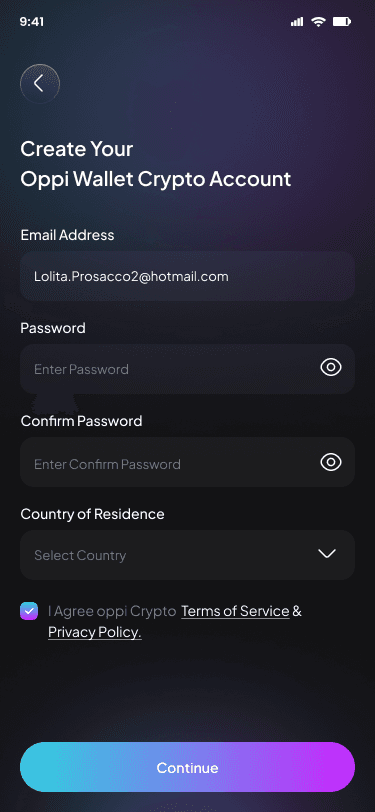
Now open the app and choose the option to create a new wallet rather than importing an existing one.
You will be guided through a simple flow to generate your self‑custody wallet.
11. Step 3: Write down your recovery phrase
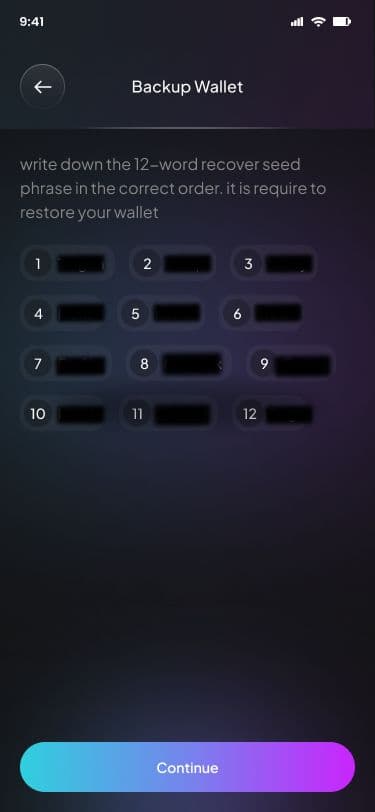
The app will show you a 12 or 24‑word recovery phrase; write it down by hand on paper and keep it in a safe place.
Do not save screenshots, notes, or photos of this phrase on your phone, email, or cloud storage, because those are common points of attack.
12. Step 4: Turn on security features
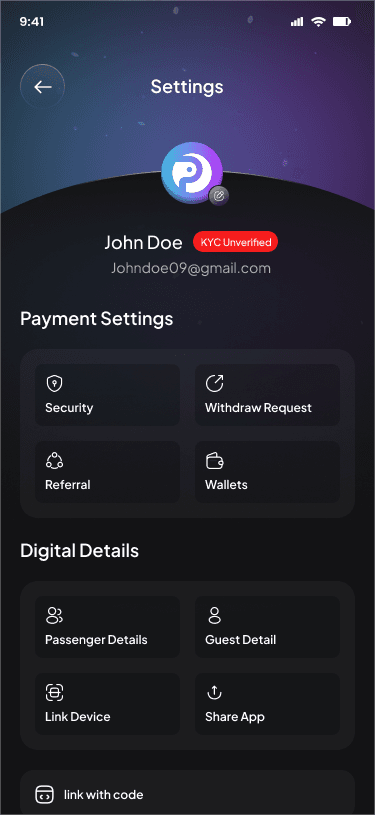
Set up a strong unlock method, such as a PIN and biometric lock, to protect access to the app.
Also keep your phone’s operating system and OppiWallet updated to the latest versions.
13. Step 5: Move a small test amount of crypto
First, send a tiny test transaction from your exchange or another wallet to your new OppiWallet address.
Once that arrives and you are comfortable, you can move a larger amount if you choose.
14. Step 6: Explore extra features slowly
After you are confident with sending and receiving, you can explore features like card payments, travel bookings, or DeFi actions supported by OppiWallet.
Take your time; you do not need to use every feature on day one.
15. Should You Use a Self‑Custody Wallet? Quick Checklist
Using a self-custody crypto wallet is a personal choice, but still you are confused then here is a simple checklist which can help you decide whether to start now or wait using self-custody wallet.
Answer these questions honestly for yourself before moving big amounts.
-
Are you willing to store something as important as house documents or passport copies safely for many years?
-
Can you spend 20–30 minutes learning the basics of seed phrases, scams, and backups before moving serious money?
-
Do you usually check links and emails carefully, or do you often click things quickly without thinking?
-
Would you be calm enough to follow a backup plan if your phone was lost or stolen?
If your answers are shows that you are still not much careful with digital security, then start with small amounts in self custody wallet and try to learn each and everything properly.
And if you already are managing your passwords properly, your important documents properly, you properly check links and emails carefully before clicking or opening them. Then you can simply start with a self-custodial crypto wallet like Oppi Wallet now.
16. Simple FAQ About Self‑Custody Wallets and OppiWallet
1. Is Oppi Wallet a self‑custody (non‑custodial) wallet?
Ans. Yes, Oppi Wallet is designed as a self‑custody wallet where your private keys are stored on your device, and not on Oppi Wallet’s servers. This means Oppi Wallet cannot move your funds or freeze your balance.
2. What happens if I uninstall the OppiWallet app?
Ans. If you uninstall the Oppi Wallet app but still have your recovery phrase (seed phrase), you can simply reinstall and restore your wallet using that phrase. If you uninstall and do not have the phrase saved anywhere, you will likely lose access to your funds permanently.
3. Can OppiWallet recover my wallet if I lose my recovery phrase?
Ans. No, OppiWallet cannot recover your wallet without the recovery phrase, because that would mean it had secret access to your keys, which would break self‑custody. Protecting and backing up your phrase is your responsibility, and it is the most important part of using any self‑custody wallet.
4. What is safer, a hardware wallet (cold wallet) or software wallet (hot wallet) like Oppi Wallet?
A hardware wallet is usually safer for large, long‑term holdings because it keeps keys offline, while a mobile wallet like OppiWallet is more convenient for daily use. Many advanced users keep long‑term funds in a hardware wallet and everyday spend assets in a secure mobile wallet.
5. Is this guide financial advice?
Ans. No, this is educational information to help you understand how self‑custody works and how tools like OppiWallet fit into that picture. You should always make your own decisions and, if needed, speak with a qualified professional before making big financial moves.
17. Final Thoughts and Next Steps
A self-custody crypto wallet gives you full control over your money and no one can freeze it or stop you to manage the, but with full control their comes responsibility as now you have to behave as your own bank, which means to secure your device truly other wise you can lose your assets.
For many people, this is empowering but for others, self custody wallets can be stressful or risky if they are not ready to manage security correctly.
If you choose to try self-custody wallets, then start with small amounts amount and follow steps in this guide properly. Take your full time in creating habits of backups and scam awareness.
Oppi Wallet aims to make the process easier by combining advanced security, multi-chain support, and features like buy, sell, store, swap, manage, virtual crypto card and travel card. So that your crypto is not just stores but also usable in your daily life.
Used wisely, self‑custody can be one of the strongest tools you have for financial independence—but it only works if you treat it with the respect it deserves.